 log
log🏗️ Home Ops Upgrades
As the number of self-hosted services I use regularly has grown, managing them by hand began to feel wrong, and occasionally annoying and tedious. It ends now!

In the beginning, my workflow was pretty sloppy since much of the deployment/management depended on me remembering to restart a container or update a version, manually copy a secret here and there. Things like this. Totally maintainable, sustainable with some effort, but it is not the way. And to some degree these manual interventions will always be necessary, but it will serve me well to reduce them and automate them away as much as reasonable to help these apps live far into the future with little fuss. Many of these apps have proven their usefulness to me over many years, so I have begun to take their management more seriously, slowly taking steps toward git-ops patterns and best practices. Before: scattered .env files. Flat directory of compose files. No documentation. Manually copying secrets by hand. Manually rebuilding host dependencies by hand. Now: a single command issued by a single click of a button (maybe I am overstating the simplicity here…nevertheless) will handle mostly everything I care about. Host setup, Compose projects, rendered secrets, state directories, validation, and deployment are all described in one place. Easy!
Git Repo as Source of Truth
I am trying to move my app hosting toward git-ops patterns, where the git repo is the “source of truth” which describes the desired state of my home apps/services etc. The repo checkout itself should stay disposable. This will be useful to me because changes become reviewable and repeatable. If I move a service to a different host, for example, or a port changes, or a secret is added, or a stack is disabled, that change will be obvious in git logs, and it will be easily deployable since everything is in one place.
Prior to this overhaul, I had one repo for each host. I decided to combine all host config to a single repo for simplicity, since managing the deployment logic across two and possibly many more repos would sort of defeat the original purpose of making things simpler and more robust. Configuration would drift apart, and all of my annoyances under the previous ‘workflow’ would return.
Ansible
The main tool making the magic happen is Ansible. This is sort of the ‘infrastructure-as-code’ layer, configuring the OS host environment in all the ways necessary to run the apps. It installs packages, configures Docker, creates state directories, manages the deploy user, mounts storage, renders secrets, and starts containers, stopping short of actually provisioning the VM/host itself (Maybe coming soon).

Inventory
I used Ansible inventory to map and name the hosts, set the connection details, and group machines so the same playbooks behave differently for each host. In the new home-ops repo, inventory lives in ansible/inventories/production/. Shared defaults live in group_vars/all.yml, host-specific settings live in, for example group_vars/edge.yml,group_vars/server.yml. This is how Ansible can decide which Compose projects run on the edge host and which run on the server host.
Roles
I am using roles to keep the playbooks organized. There is some reuse between each playbook since the host env is basically the same. The playbook will define the order of operations, while the roles will be the steps of host setup:
- related work stays together
- shared setup can be reused across host groups
edge-only andserver-only behavior stay separated- common tasks do not need to be copied between playbooks
In this repo:
commonprepares the basic host environmentdockerinstalls Docker and Composestatecreates runtime state directoriesstorage-mountsmanages NAS mountsedge-hosthandles edge-specific host setupstep-casyncs private CA trustpreflightchecks required rendered filescompose-projectsruns the enabled Compose apps
Compose Projects
Each app “stack” is a Compose project under stacks/apps/ and stacks/edge/. A stack can include more than one container, since many apps depend on supporting services/containers, e.g. web container, a database, a cache, a worker.
State Directories
Ansible creates state_root and app-specific state directories. Compose uses ${STATE_ROOT:-/opt/home-ops-state}.
State lives outside the repo because as I mention above, the repo checkout should stay disposable. A deploy can replace or update /opt/home-ops without deleting databases, uploads, generated config, caches, or other runtime data. The repo describes the desired configuration; /opt/home-ops-state holds the mutable state created by running services.
Deployment Paths
Production deployments can run from Gitea Actions or manually from a control machine. A control machine is a machine running Ansible which connects to the target hosts over SSH and applies the playbooks there. Manual Ansible runs are useful for development, testing, and recovery when the Gitea workflow is unavailable. For example, from a prepared control machine:
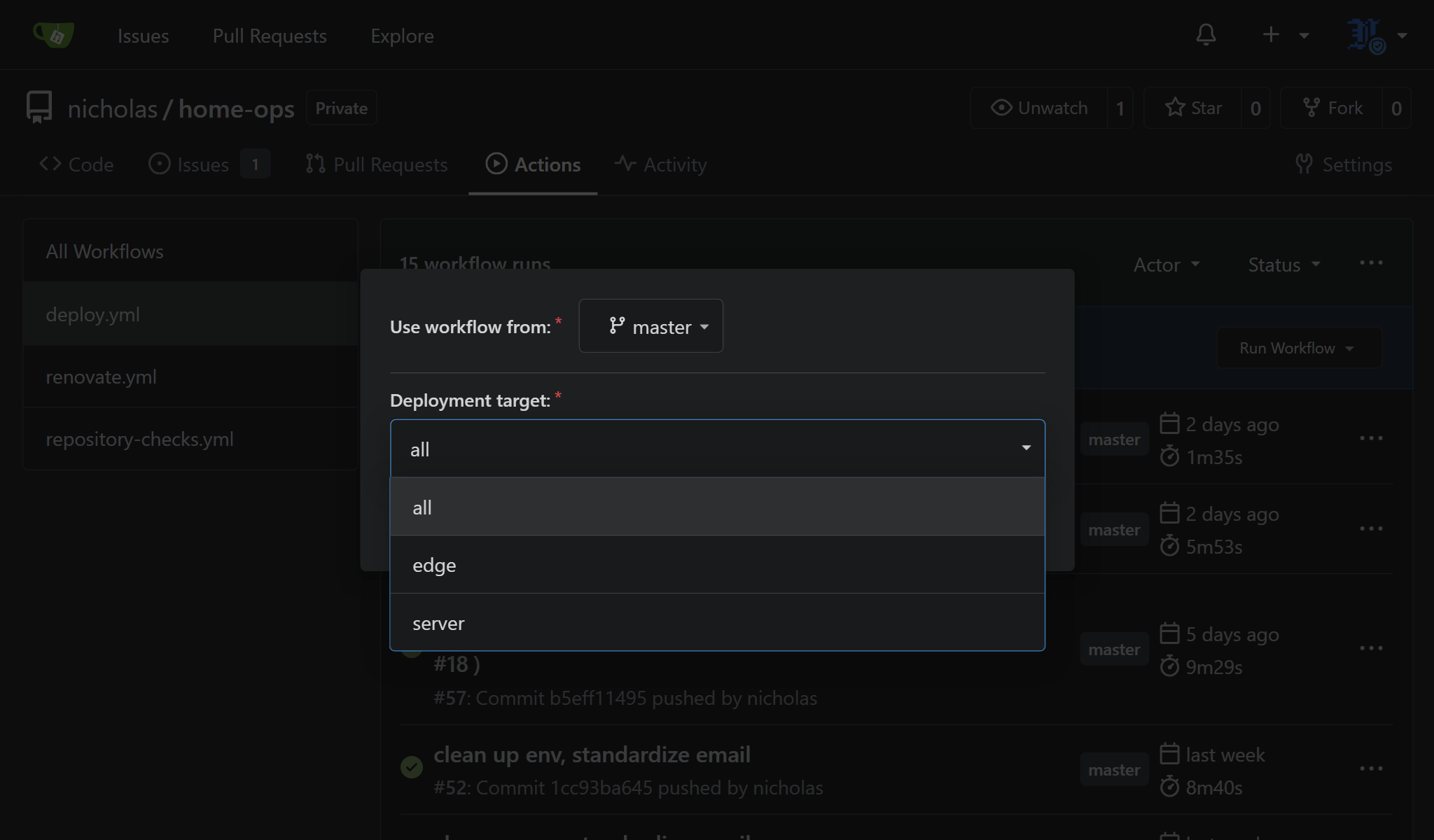
ansible-playbook playbooks/server.ymlBut the simplest/easiest way to deploy is to click a button in a web UI. My Deploy workflow supports all, edge, and server targets.
Data
Large data which ought to live on my NAS are bind-mounted under /mnt/data and /mnt/backup. Ansible can create mount point directories, but NAS ownership and ACLs are managed on the NAS side. The point is to keep large media and backup data out of the repo host filesystems. They take up a lot of space and do not belong on the fast, limited storage on container hosts.
Some services use Docker volumes for persistent state, for convenience, since I am happy to let Docker manage the data and do not much care about these details. For long-lived or state that I care about, I want to use /opt/home-ops-state which is easier to reason about because it has an explicit path and can neatly be included in a backup/restore operation.
Secrets
Secrets are stored in SOPS and rendered before Compose starts. Plaintext .env files, private keys, and decrypted secrets are not committed to the repo. Keeping encrypted secrets in the repo is useful because the secret manifest can live next to the configuration that needs it. I can see that a service requires a .env file or mounted secret file without committing the plaintext values. Secret changes also get version history like any other infra change and the actual secret values remain encrypted. This is much preferred to keeping secrets as random files on one host and manually copying them onto others. The repo can describe which secret files must exist, where they should be rendered, and which services consume them. SOPS handles the encryption and Ansible handles rendering the files during deploy.
App Env Secrets
Most app secrets are rendered from the same SOPS secret_files list. Ansible decrypts the SOPS file on the control machine, then writes each secret file to its destination before Compose starts. The app secrets mentioned are mostly in the form of a per-service .env files that live next to the app’s compose.yaml. Compose reads that file and uses the values for environment variables. A couple of other apps use the same idea, but instead require app-specific secret files rather than .env files. These are still SOPS-rendered secrets, but the destination is a mounted runtime file rather than a .env file.
Deploy Secrets
Deploy secrets are not consumed by the apps themselves but instead are used by the deployment system so Gitea Actions or a control machine can connect to the hosts and render production secrets.
For example, the Gitea deploy workflow uses secrets:
DEPLOY_SSH_KEY: allows the action runner to SSH to the inventory hosts as thedeployuserSOPS_AGE_KEY: decryptssecrets/sops/production.sops.yml
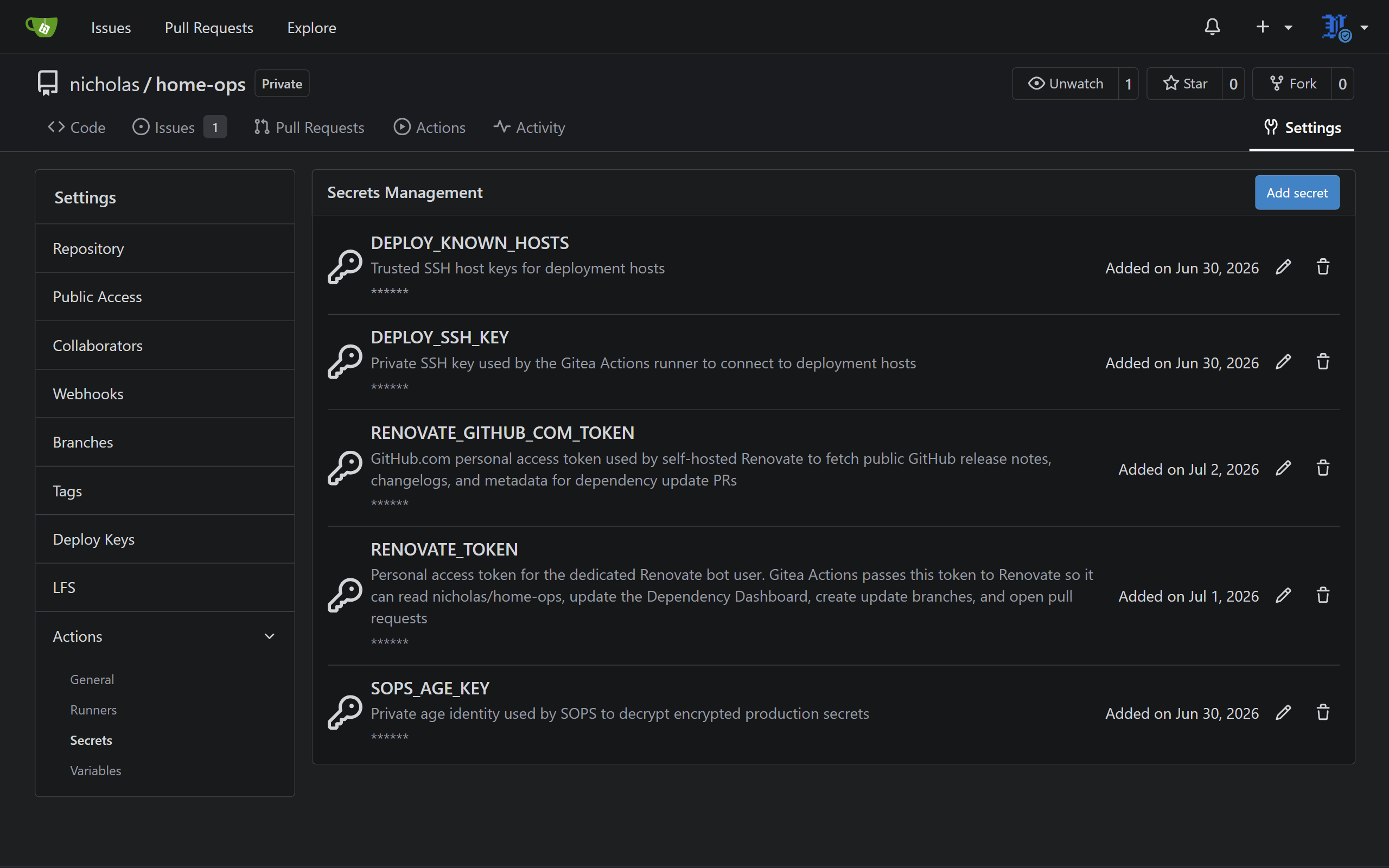
This separation is useful because deploy credentials have a different lifecycle from app credentials. Rotating a deploy key should not require changing app .env files, and changing an app password should not affect the deployment path.
Deploy User
The deploy user is used for production Ansible runs and gets passwordless sudo through a dedicated sudoers file. This gives the ansible automations its own dedicated identity instead of using my personal login. There is a playbook for creating the user, installing the committed public key, and granting passwordless sudo.
Renovate
Renovate watches my Docker images and opens PRs when updates are available, but only if I select the proposed update in the Dependency Dashboard. This dashboard is a Gitea Issue the renovate-bot user creates and manages, and it is used by Renovate to decide which images should be updated by way of a pull request. Since I do not want every Docker image involved yet I limit Renovate to only the Compose stacks in my whitelist.
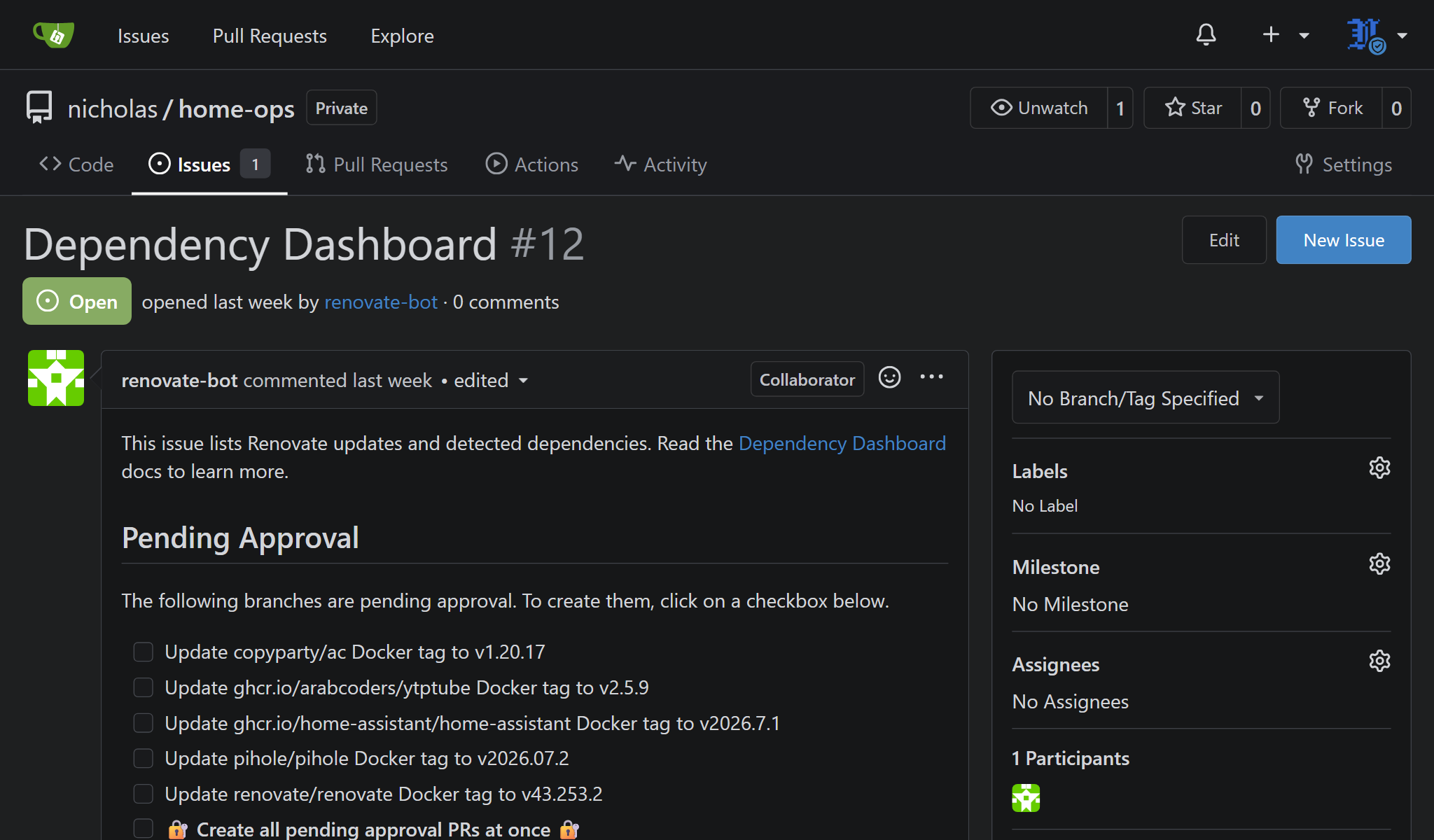
The Renovate workflow can run on a schedule or manually from Gitea Actions. Renovate proposes updates which I can review and deploy manually (or automatically if I want, I suppose). It is highly configurable, but I have kept my own configuration simple and mostly manual for now.
This workflow requires some secrets:
RENOVATE_TOKENGitea access token so Renovate can create issues and PRs.RENOVATE_GITHUB_COM_TOKENused by Renovate to access GitHub-hosted release notes and metadata.
Future Changes
Future changes will mostly be about making hidden state less hidden, which means moving important Docker volumes into explicit state paths. I may also revisit secrets management approach later if I want to experiment with using a secret manager e.g. HashiCorp Vault. It is still possible to go a layer deeper than the apps, into the true infrastructure layer with Terraform or OpenTofu. Lots of possibilities, but for now, it is good enough.
✅ Done.